ID: org.v1al
Version: 1.49
Size: 1 Mb
glSDR Screenshots
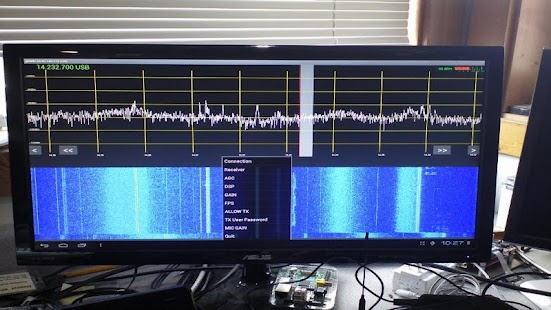
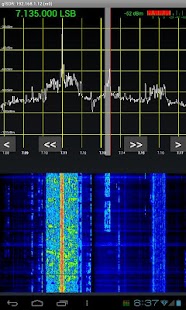
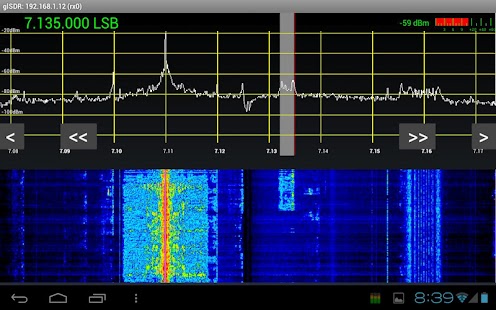
How to setup glSDR apk for android
- For Android 4.0 or higher:Please to Settings, look down to Security, and select Unknown sources. Choosing this choice will enable to install apps download from the internet.
- For devices running on lower Android 4.0:
Please go to Settings - open the Applications option, and select Unknown sources, click OK on the popup alert.
glSDR Details
Client app for connecting to Amateur Radio (Ham Radio) online servers. This version uses opengl ES 2.0 for the waterfall graphics display and may not work in some devices. Click on the menu on the bottom right corner to select the online servers.For information of glSDR and the servers, use the About menu.
The first client that connects to a server is in master mode, and has control over the vfo and other controls so that it can tune and change bands and frequency etc. Subsequent client connections will be put in slave mode where the slave clients can only listen to the audio and watch the spectrum and waterfall in passive mode. When the master disconnects, the next slave in line will become the new master. When there are many simultaneous clients, the network bandwidth may be exceeded and some slaves will not have audio. You can see the master/slave status of your connection in the Title bar.
There is automatic Rx IQ Correction that you can enable/disable via the DSP tab. Note that you should enable Rx IQ Correction only for servers connected to IQ based SDR hardware (eg Softrock, UHFSDR), but NOT for direct sampling hardware (eg Perseus).
It has better display for high bandwidth servers. These servers have sampling rates of 480 ksps or more thus the spectrum/waterfall displays a wide bandwidth.
Minimum of Ver 8 is needed for new versions of servers with a revamped Local Oscillator Offset mechanism.
Ver 9 has spectrum/waterfall zoom feature. Use pinch motion to zoom/unzoom. I have found it easier to put one finger in a fixed position, and then zoom/unzoom by moving the other finger.
Ver 10 has improved drag tuning taking into account the zoom factor.
Ver 11 has been tweaked for backward compatibility with Android 2.2 devices.
Ver 12 has Spectrum Averaging options and also one FMN filter at 80khz for listening to Wide Band FM Broadcasts.
Ver 13 has more Spectrum Averaging levels.
glSDR has TRANSMIT capability in voice modes, ie SSB, AM, NBFM etc. However, you need to supply the User and Password to enable transmit when connecting to a password protected server (ie ALL the public online servers). Also, it requires that your device is capable of MIC input at 8khz sampling rate. DO NOT install this version if your device is not compatible !!!
Version 25 has FILTER MENU updated swhen MODE changes. The zoom action is also magnified when unzoomed or at low zoom so that you can zoom "faster" initially.
Version 26 has been tweaked to support Adreno GPU based devices by working around some issues with 24 bit color transparent overlay surfaces in Adreno driver.
Version 27 has the waterfall initialized correctly.
Version 28 has bugfix for band specific frequency after changing from a slave connection to a master connection.
Version 29 has a customized View of the FILTER MENU to indicated the currently selected Filter.
Version 30 has a customized View of the SERVER MENU to indicated the currently selected Server.
Version 31 has an easier to understand error message when a Server is unavailable.
Version 33 has a MASTER menu button that can take over a server as the master connection, provided you have the User/Password set for the server. The User/Password is usually known only to the server owner.
Version 35 has minor bug fixes and a new MENU option for the arrow keys.
Version 36 fixes the bug when a blank Frequency is entered.
Version 38 has a MENU item for users to donate bitcoins to the project.
Version 39 has a DSP checkbox for RX DC Block. This eliminates or reduces the central spike in some radios from differential in the DC potential of the I and Q channels.
Version 40 has a "Donate Bitcoin" menu item for you to support this project. The bitcoins donated will go towards improving the number and quality of the backend servers and service quality.
Version 41 has improved stability to prevent crashes on fast rotation of screen orientation.
What's new in glSDR 1.49
Version 49 allows the use of devices without a valid MIC input, for receive only. In older versions, the app exits with errors without a valid MIC input. As expecged, voice transmit will not be possible without a MIC.Download glSDR 1.49 unlimited APK
Search terms:
How to install glSDR lastet apk for bluestacks
How to use glSDR mod apk
How to mod glSDR 1.49 apk
How to get glSDR unlimited apk
<span style="color:red">Laurie Parkes:</span> OK for what it is I mistakenly thought this was a SDR receiver that connects to a RTL SDR Dongle, and spent a lot of time trying to tune in to different frequencies. My mistake. As it turns out it is a good app for listening to hams that are on a particular server, like echolink? But it is not a general coverage SDR receiver.<br /><br /><span style="color:red">J Brandt:</span> Very Nice Tuning seems counterintuitive, as you scroll the waterfall instead of holding the waterfall still and moving the bandpass. Makes zeroing in on a signal a bit cumbersome since any tuning invalidates the information in the waterfall. Five stars otherwise.<br /><br /><span style="color:red">Hans de Zeeuw:</span> Not working on a samsung galaxy tab s There is no menu at all so you can do nothing.... useless...<br /><br /><span style="color:red">Lydia Jade:</span> Like it looks like it used to be good Does Not render well on high resolution devices, and it's reliant on the legacy menu key. It does seem to function well though.<br /><br /><span style="color:red">Felix Lopez:</span> Glsdr Use to be fine for the LG Lucid2 but on the newer LG G3 cant see the 3 dots to select other radio servers.<br /><br /><span style="color:red">Societal Pillage:</span> The app has stuttering issues on my (admittedly old) droid x and the waterfall doesn't show up even though the phone reports it supports opengl 2.0 ES.<br /><br /><span style="color:red">Mykal Anstrom:</span> Great app Love the app. Ive occasional even tuned to my transmit frequency when calling cq to test propagation. One question though, I've been searching around online and have yet to find how you get a password to transmit via the app.<br /><br /><span style="color:red">Robert Beswick:</span> KA6PSD Work great on galaxy s2 However galaxy S5 press and hold the left icon at the bottom of the phone for three seconds to get the menu<br /><br /><span style="color:red">erich rieder:</span> Galaxy win Duos not work Would be a great app i see the value. But on my GT-I8522 Galaxy Duos not woking.<br /><br /><span style="color:red">Mr Constantine Updates:</span> Not good There's better out there<br /><br /><span style="color:red">Aaron Lamb:</span> Does not work Just a black and white screen on 4.4 GS5<br /><br /><span style="color:red">Stuart Schofield:</span> Samsung Note4 Worked once but unable to select other sdr servers. The selected Server is unavailable...... Please use MENU (looks like 3 dots at bottom of your device) to select another Server. There isn't three dots at the bottom of my device.<br /><br /><span style="color:red">Eric Inloes:</span> Good! Appears to work well! The comment below from the auth was the fix :)<br /><br /><span style="color:red">fabian rodriguez:</span> Nexus 7 Love this app is like have a Grundig receiver nice work, to my ham radio friends high recommended<br /><br /><span style="color:red">Runjam Webster:</span> What happened I plugged in apple headphones on my Samsung mega and now won't put out audio. I unistall and reinstall 2 times all other applications work as intended. ???????<br /><br /><span style="color:red">Steve Marquie:</span> Fix for the S5! Please get the menu options working for the Galaxy S5!<br /><br /><span style="color:red">Matt Rainey:</span> Pretty cool Needs a bit of tweaking, but it definitely has potential.<br /><br /><span style="color:red">Alfredo Canote:</span> SWL rules!<br /><br /><span style="color:red">Jess Lavold:</span> Is glsdr down there no servers what's up???? :-(<br /><br /><span style="color:red">Josh L:</span> Great Doesnt work on s5 sport<br /><br /><span style="color:red">guy falsetti:</span> Awrsome<br /><br /><span style="color:red">Hein Bertram:</span> Marvellous!<br /><br /><span style="color:red">Onno Benschop:</span> Excellent Works well, is stable and allows me to monitor my own propagation. Two issues: 1: The server order keeps changing, so you cannot try each one in turn. 2: The menu is too big for my phone screen and it doesn't scroll, so you cannot use all menu items.<br /><br /><span style="color:red">Rick Covert:</span> First Real Internet Accessible SDR I first used this app just over a year and a half ago but this is the first time I have been able to exploit all the feature of this app since I upgraded my phone to a quad-core processor based phone like the waterfall display. Wow is all I can say.<br /><br /><span style="color:red">Chris G:</span> Wont connect galaxy s5 Looks great but wont connect or even open on galaxy s5. Disappointing<br /><br /><span style="color:red">PHILLIP LOVE:</span> 5 stars for this one Works great on my Samsung Galaxy Tablet,,wish there were more than the 12-13 servers...also seem to always be the slave instead of master...but that seems to be changing for the better the last 2 weeks or so..I did not put the update because I have not had trouble with it freezing..so I did not want to fix what is not broke...All om all great app!!!<br /><br /><span style="color:red">Mike Farkas:</span> WoW What an app. I have used other SDR apps in the past and this app is the best one I have used so far hands down!<br /><br /><span style="color:red">Vera Grumpe:</span> g1sdr Extraordinary app. Works brilliantly on Android tablet. More servers please.<br /><br /><span style="color:red">Julian Agnew:</span> Won't connect Refuses to connect to any server. Fix it!<br /><br /><span style="color:red">D. Gunaseelan Guna:</span> Good<br /><br /><span style="color:red">Matthew Cushman:</span> Mind boggling app - 5 stars for concept This app gets 5 stars just for existing. However, the ui could use some serious work, particularly for those of us who are not familiar with ham radio and the various acronyms thereof. In particular I'd prefer if the spectrum (waterfall) would remain static while the tuned frequency and filter pass - band would move. Then a pan and zoom on the whole thing would be the icing on the cake. See various websdr sites for examples.<br /><br /><span style="color:red">Farhan Masani:</span> Great alternative to an SW radio! Discovered this after using some Web based SDRs and love the app, the only thing stopping me giving this 5 stars is the crashes I get even on a relatively modern phone :-(<br /><br /><span style="color:red">Tony Kelts:</span> Really cool app I have a couple of shortwave radios but sometimes it is easier to use this app to tune in some stations that don't reach me here in central Florida.<br /><br /><span style="color:red">Brendan Riesebeck:</span> Glsdr Will not connect to servers wast of time<br /><br /><span style="color:red">Mick Ey:</span> Away from your sw radio? Consider this<br /><br /><span style="color:red">paul37421:</span> Very good app<br /><br /><span style="color:red">Patrick Harrington:</span> One of the best programs for Android ever.<br /><br /><span style="color:red">Denis Ouellet:</span> Great app; thank you<br /><br /><span style="color:red">Mickey C:</span> Very nice works good thank you very much<br /><br /><span style="color:red">Curt Rowlett:</span> Impressive! What seemed to be bugginess at first was in fact operator error, as I read the developer's description and eventually figured out the whole "Master/Slave" server thing, after which the app worked great. I have glDSR loaded onto my Android smartphone, using the 2.3 Gingerbread operating system. Many thanks Alex Lee Shing Cheung for creating a great app that is lots of fun to use.<br /><br />