ID: pt.teixeira.tvcontrol.philips
Version: 2.0
Size: 0.3 Mb
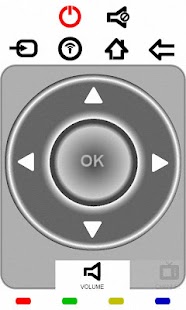
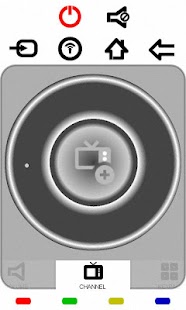
Philips TV Remote 2k11 Screenshots

How to setup Philips TV Remote 2k11 apk for android
- For Android 4.0 or higher:Please to Settings, look down to Security, and select Unknown sources. Choosing this choice will enable to install apps download from the internet.
- For devices running on lower Android 4.0:
Please go to Settings - open the Applications option, and select Unknown sources, click OK on the popup alert.
Philips TV Remote 2k11 Details
Philips TV Remote is designed for use on the 2k11 Philips NET TV models. The main purpose is to replace the standard remote controls.Please READ carefully configuration steps listed below!
This is a light-weighted Application, with a very easy to use interface. It allows to control the following functions:
- Volume Up/Down (use the scroll wheel or phone volume keys)
- Navigation cursors
- Media Player control
- Ambilight control (use scroll wheel to change color), also with automatic color changing control.
- Internet mode with full landscape and user friendly keyboard.
- Channel Change(used scroll wheel)
- and much more...
Note that for keyboard mode to function properly, you have to set TV menu language to English. In case your TV languages settings are different than English, you may purchase a 2k11 Key Mapping plug-in available for other menu languages.
This plug-in is available at:
https://play.google.com/store/apps/details?id=pt.teixeira.tvcontrol.philips.language.plugin2k11
This App controls the TV via jointSpace http commands.
An initial tv setup is required for all commands to work accordingly:
Step 1.
If you are not sure if your tv is a 2k11 model, please check the following link:
http://www.supportforum.philips.com/en/showthread.php?593-Net-TV-models
Step 2.
If your TV is not listed in above mentioned list, App will not work.
If you have a 2k10 model, note that not all commands are supported!
TV's produced before 2009 can NOT use this App!
Step 3.
The TV needs to be activated to accept Remote Applications (one time operation)
For that you need to enter the following keys sequence from the TV remote control, for e.g. while watching TV:
5646877223 (="jointspace" using multitap digit entry)
Make sure this is activated, otherwise your app won't be able to communicate with your TV!
Step 4.
Change/Get the IP setting of your TV. It is recommended to use a static IP address.
To check or set TV IP address, follow the sequence: Press HOME button >> Setup >> Network Settings >> IP Configuration >> IP Address.
Note down the IP number for further settings in you App.
Step 5.
Enable Wifi on your phone and Start your App. You will be prompt to input your TV IP address (one time operation). Your app is ready to use!
What's new in Philips TV Remote 2k11 2.0
Added Troubleshoot Guide.Added key Mapping for the following Languages:
Arabic
Bulgarian
Greek
Russian
Ukrainian
Added Special Keyboard for the following Languages:
Argentinian Spanish (QUERTY ES)
Brazilian Portuguese (QUERTY PT)
Bulgarian (CYRILLIC)
French (AZERTY)
German (QUERTZ)
Greek (GREEK)
Kazakh (CYRILLIC)
Portuguese (QUERTY PT)
Russian (CYRILLIC)
Spanish (QUERTY ES)
Ukrainian (CYRILLIC)
Download Philips TV Remote 2k11 lastet APK
Search terms:
How to download Philips TV Remote 2k11 patch 2.0 apk for pc
How to use Philips TV Remote 2k11 mod apk
How to mod Philips TV Remote 2k11 2.0 apk
How to get Philips TV Remote 2k11 unlimited apk